1. Photo size and composition
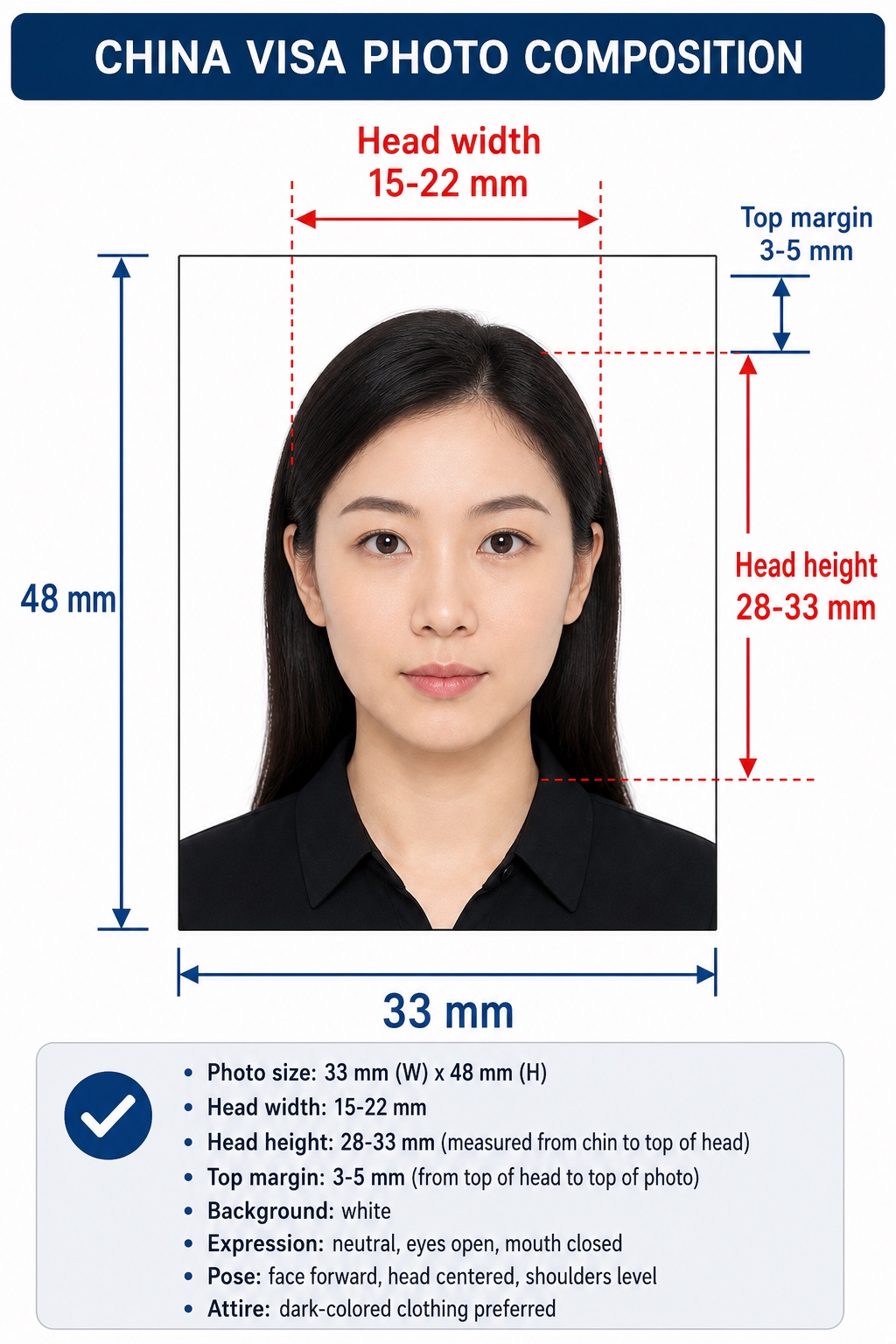
The China visa photo format is a vertical portrait, 33 mm wide by 48 mm high. The face must be centered and upright. Official photo guidance uses a head width range of 15 mm to 22 mm, a head height range of 28 mm to 33 mm, and a top margin of 3 mm to 5 mm from the top of the head to the top of the photo.
Physical photo size
33 mm x 48 mm
Chinese visa photos use a vertical portrait ratio, not a square U.S. passport photo format.
Head width
15 mm to 22 mm
Measured across the widest part of the head.
Head height
28 mm to 33 mm
Measured from the bottom of the chin to the top of the head, including hair.
Top margin
3 mm to 5 mm
Distance from the top of the head to the top edge of the photo.
Face position
Centered and upright
Keep shoulders level and face the camera directly.
Background
White or near-white
The background should be plain, clean, and shadow-free.
2. Digital photo upload requirements
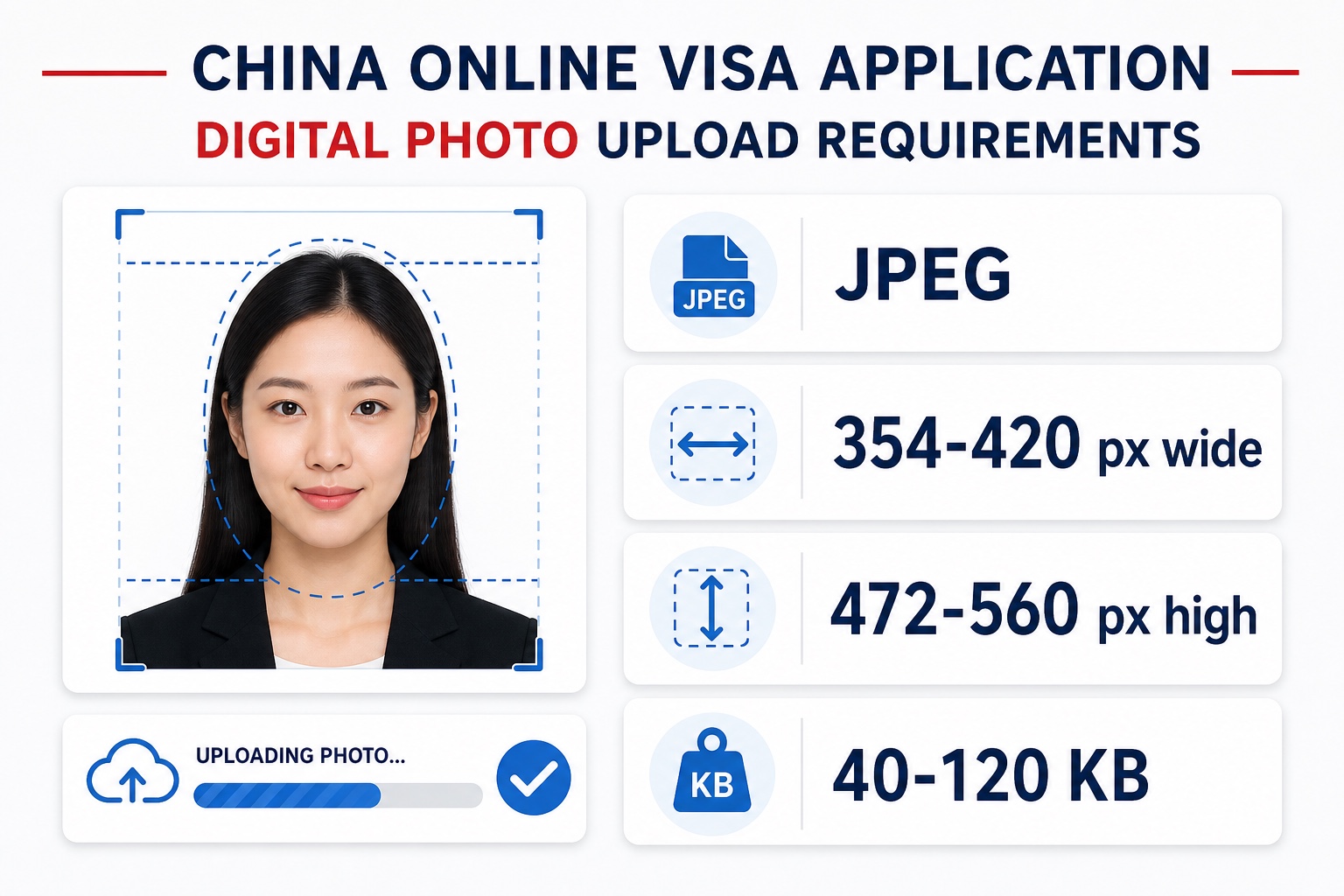
U.S. applicants now use the China Online Visa Application system for the application workflow. The digital photo should be a JPEG image with the required portrait dimensions and file size range. A file that looks correct visually can still fail upload if the pixels or file size are outside the accepted range.
Use the correct dimensions
Export the digital file at 354 to 420 pixels wide and 472 to 560 pixels high.
Keep JPEG file size in range
The file should be JPEG and generally between 40 KB and 120 KB for the online application upload.
Do not add visual marks
The final upload file should not contain borders, measurement labels, stamps, flags, watermarks, or text.
3. Background, lighting, and clothing
Use a plain white or nearly white background, even lighting, and natural skin tone. Dark clothing is preferable because it separates the shoulders from the white background. Avoid white tops, uniforms, heavy shadows, tinted lighting, and patterned walls.
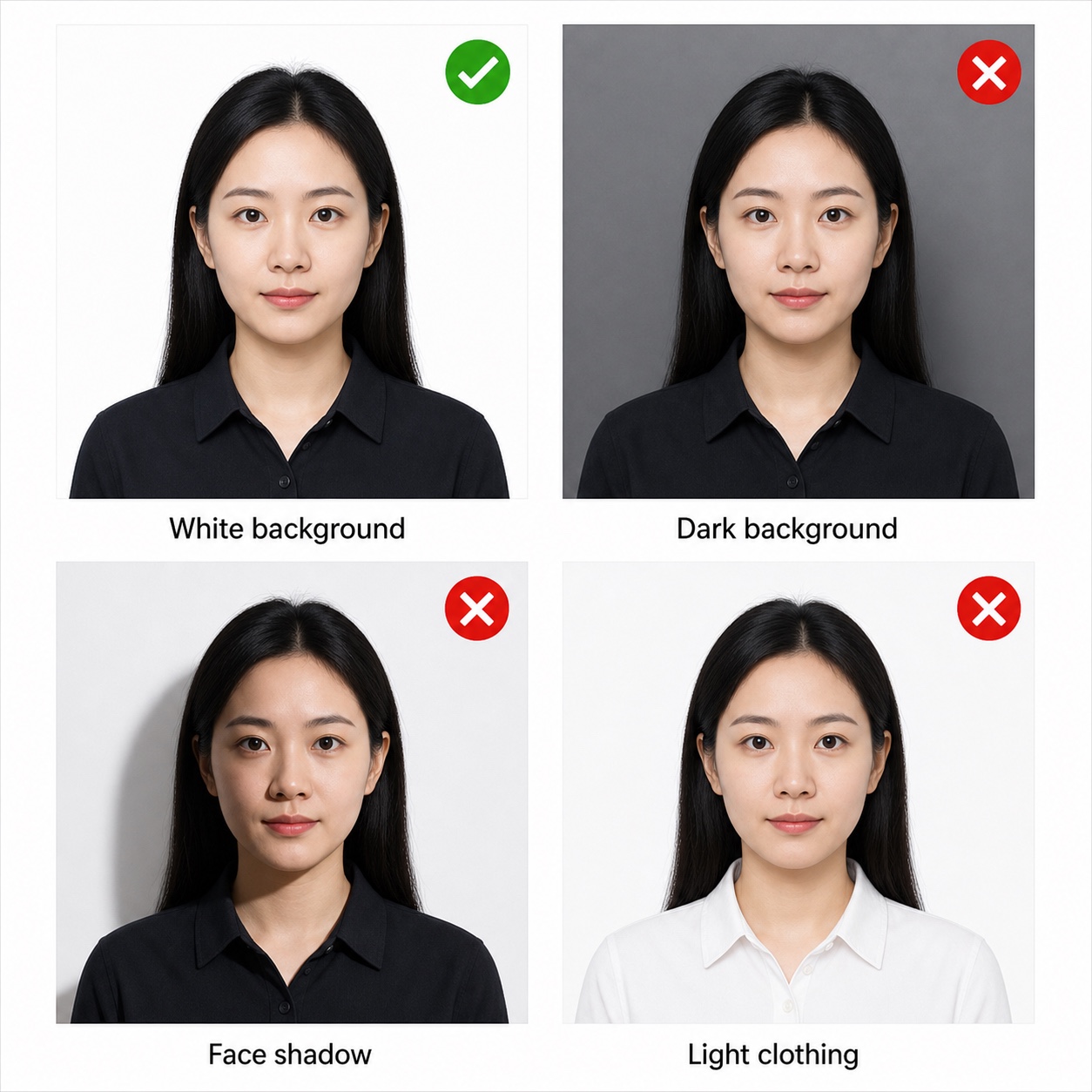
Use a plain white background
The background should be white or nearly white with no wall texture, objects, or patterns.
Avoid shadows and color casts
Use soft front lighting so the face and background are evenly exposed with natural skin tone.
Wear dark normal clothing
Dark everyday clothing helps the shoulders separate from the white background. Avoid uniforms and white tops.
Keep the full face visible
Hair, accessories, head coverings, or shadows should not obscure the eyes, eyebrows, nose, mouth, jawline, or face outline.
4. Pose and facial expression
Face the camera directly with your head centered, eyes open, and mouth closed. The photo should show a natural front-facing portrait. Do not tilt your head, look away from the camera, smile with teeth, open your mouth, or let hair cover the face.
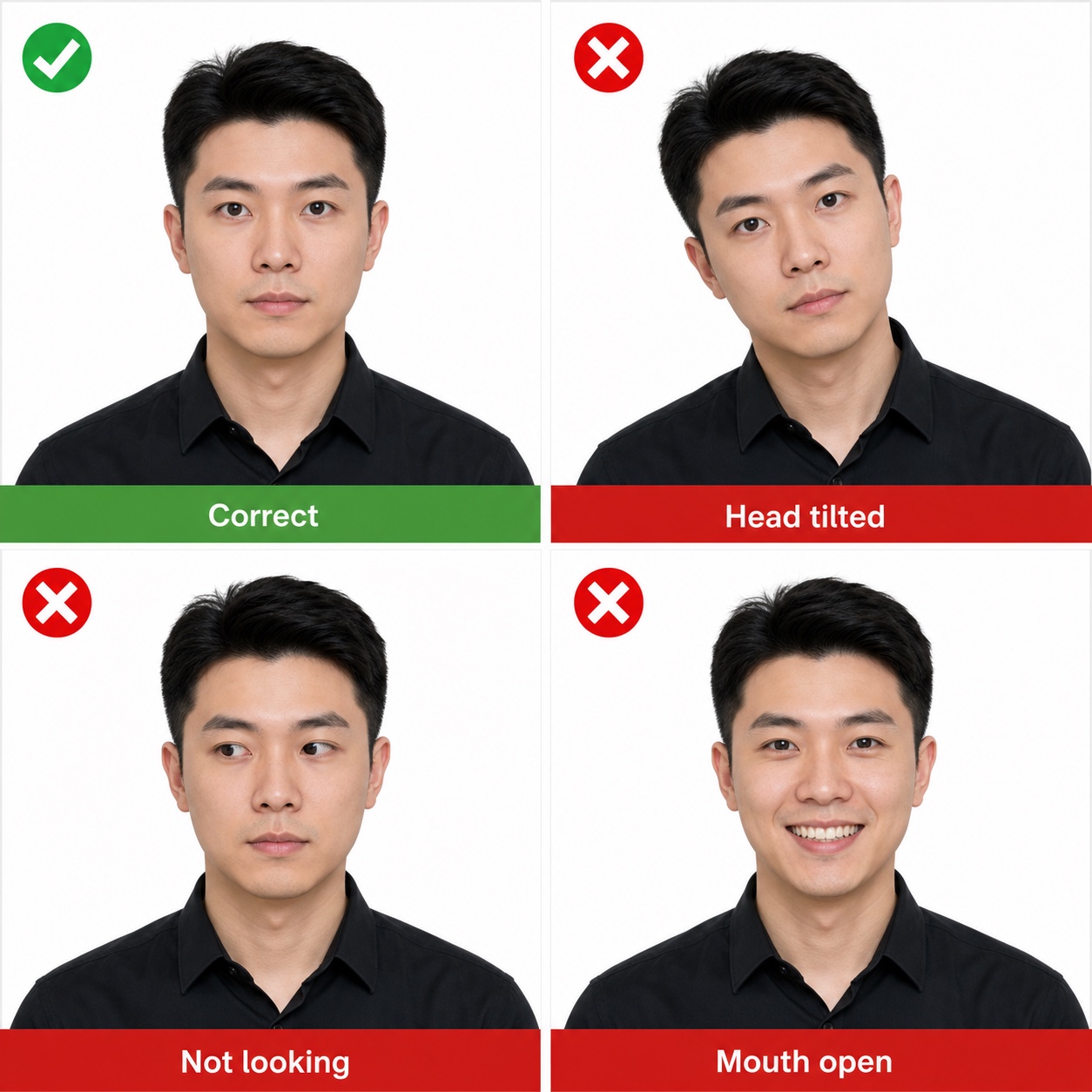
Look directly at the camera
The face should be front-facing, centered, and not rotated or tilted.
Keep eyes open and mouth closed
A neutral expression is safest. Avoid big smiles, open mouth, or exaggerated expressions.
Remove glasses and headwear
Avoid eyeglasses, sunglasses, hats, caps, and headphones. Religious head coverings should not hide the face.
Use a recent natural photo
The photo should reflect the applicant current appearance and should not be retouched or beautified.
5. Print and image quality
Your final image should be clear, sharp, correctly exposed, and free of visible compression artifacts. If you need a physical copy, print the 33 x 48 mm image on quality photo paper and keep the same crop. Do not add borders, measurement marks, watermarks, text, flags, or decorative backgrounds.
Preserve natural appearance
Sizing, background preparation, and lighting balance should not change identity, facial features, hairstyle, skin texture, or age.
Keep the image sharp
Avoid blur, motion blur, low resolution, heavy compression, overexposure, underexposure, and red-eye.
Prepare a clean final file
The final image should be a clean portrait only. Do not include text, borders, guide lines, logos, or decorative elements.
Check the latest local instructions
Chinese consulates and the COVA system may update workflow requirements, so confirm the current instructions before submission.
6. Common reasons China visa photos fail
Using a square U.S. passport photo
China visa photos are 33 x 48 mm. A 2 x 2 inch U.S. passport crop has the wrong aspect ratio.
Wrong digital dimensions or file size
A photo can look correct but fail upload if pixel dimensions or file size are outside the accepted range.
White clothing on white background
White or very light tops may blend into the background and reduce shoulder visibility.
Retouched or beautified face
Skin smoothing, face reshaping, filters, changed hairstyle, or altered expression can make the photo look unnatural.
Face not centered or head tilted
The head should be upright and centered with the full face visible.
Shadows, glare, or busy background
Shadows on the face or wall, reflective glare, gray backgrounds, and patterned walls can cause rejection.
China visa photo FAQ for U.S. applicants
What size is a China visa photo?
The standard China visa photo size is 33 mm wide by 48 mm high. This is different from the U.S. passport photo size of 2 x 2 inches.
Can I use a U.S. passport photo for a Chinese visa application?
Usually no. A U.S. passport photo is square, while the China visa format is a vertical 33 x 48 mm portrait. Start from the same source photo if it is recent and natural, but crop and export it to the China visa format.
What are the head size requirements?
Official Chinese visa photo guidance uses head width of 15 mm to 22 mm, head height of 28 mm to 33 mm, and a top margin of 3 mm to 5 mm from the top of the head to the top of the photo.
What digital photo size should I upload to COVA?
The common digital requirements are JPEG format, 354 to 420 pixels wide, 472 to 560 pixels high, and 40 KB to 120 KB file size.
What background color is required?
Use a white or nearly white background. It should be plain, clean, evenly lit, and free of shadows, patterns, furniture, or objects.
Can I wear glasses in a China visa photo?
Avoid eyeglasses, sunglasses, tinted lenses, and glare. The eyes and full face must be clearly visible.
Can AI be used to make the photo?
Use AI only for preparation tasks such as crop, sizing, white background, and lighting balance. Do not change identity, facial features, skin texture, hairstyle, expression, age, or natural appearance.
Official sources
Use these official resources to confirm the current visa workflow and photo specifications before submitting your application.